


Keep the conversation inside the project.
A GearHead project is more than a folder: it keeps project information, files, notes, conversations, time, and relevant AI context together while you work.

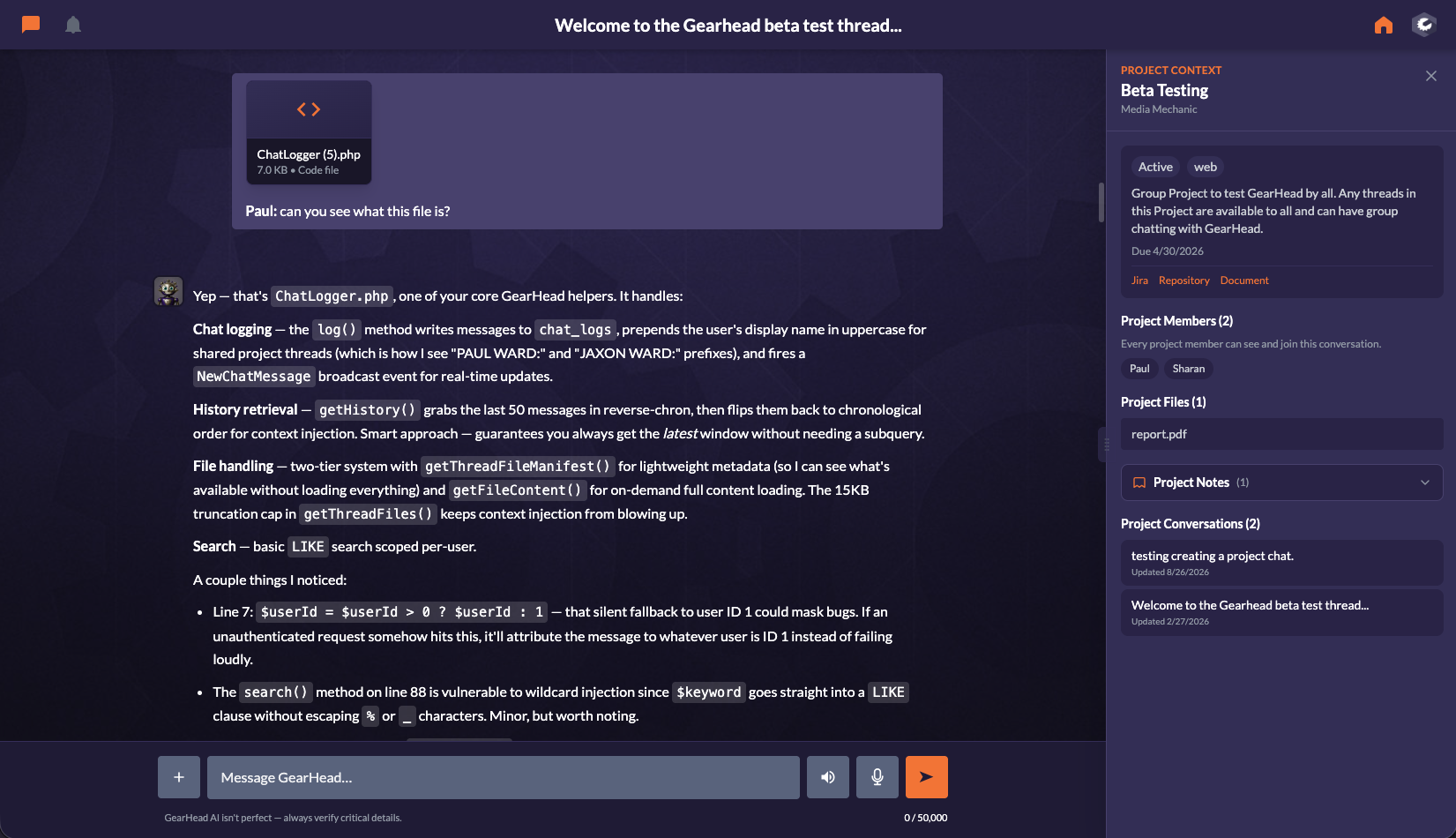
The project workspace keeps the project visible while the conversation continues. Open an existing Project Conversation or start one from the project composer without being thrown back to a generic home screen. On desktop, a persistent adjustable context rail keeps the project beside the thread; on mobile, the conversation opens first and Project Context remains one tap away.
Your conversations and project work, together
What it does for you
Pro and Teams use the same established project system; collaboration presentation appears only where more than one person can participate.
Project Conversations
Start from the project composer or reopen a prior thread. The project identity and relevant context stay attached throughout the conversation.
Persistent Project Context
Keep project summary, files, notes, conversation history, and—on Teams—members available beside the active thread without scrolling away.
Files and notes together
Review shared or private project files and notes from the same workspace. Notes remain collapsed until needed so the conversation list stays legible.
Private work on Pro
A Pro account has one user, so author badges, sharing disclaimers, thread rosters, member lists, and unnecessary user selectors stay out of the way.
Collaboration on Teams
Teams adds members, shared project conversations, shared files and documents, assignments, organization connections, and cross-user context.
Project-aware AI context
The project identifier, client context, relevant files, and permitted semantic memory remain available to the existing Runtime while you work.
From setup to running in minutes
Open a project
See project information, files, collapsed notes, and Project Conversations.
Choose or start a thread
Open a conversation or type directly into the project-aware composer.
Work with context visible
Keep the conversation central and use Project Context when you need files, notes, history, or members.
Continue later
Return through Projects and reopen the thread with its project identity and history intact.
Who's using Projects
Private client work without team overhead
Keep client projects, conversations, notes, files, and individual time in one workspace. Upgrade only when additional people need to participate.
Shared work with a visible project home
Authorized members see the same project materials and shared conversations while the thread records who participated.
Connect meeting notes and service requests
Keep the follow-up conversation close to the project, its notes, relevant requests, and the documents created along the way.
Move from overview to execution
Enter a project from the workspace, handle the work in context, and return to the Dashboard when you are ready for the next priority.


Put the work where the conversation lives.
Use private projects on Pro, or add the people and shared context your team needs with Teams.